

Tóm tắt nhanh
Lauren Tan says she shipped 2,500 pull requests to production in a single month. If you still test every agent’s changes by hand, ten agents can leave you…
- 1. Setup (connect the repository and run it once): Start with one bot and one repository. The first task is to confirm that an agent can access the code, install dependencies, and run the application.
- 2. Verification (make the agent test the application): A typecheck can pass while login fails in the browser.
- 4. Issue to PR (run the first task): Give the team one specific job:
- 6. Run (measure the result): Choose another small issue in your GitHub copy.
Lauren Tan says she shipped 2,500 pull requests to production in a single month.
If you still test every agent’s changes by hand, ten agents can leave you with ten PRs waiting for review. Someone has to run the app, check the behavior, and catch regressions.
here’s how i shipped 2,500 PRs last month to production
this was originally supposed to be for Cursor Compile in London. i couldn’t make it since i was livestreaming for Grok @Bot Galaxy so i’m making it available for free here on X! watch it on 2x speed, i talk slowly
— lauren (@poteto) · 2026-09-21

Lauren’s “pstack” workflow gives agents the tools to do those checks themselves. They run the application, test the changed feature, and save evidence. The instructions live in the repository, where the next agent can use them.
In this article, I’ll show you how to build an agent team using Lauren Tan’s method.
You’ll assign roles, set up verification, and take an issue to a PR. Then you’ll automate checks and run agents in parallel.
Each PR will show what changed, what passed, and what needs your review.
Let’s start
1. Setup (connect the repository and run it once)
Start with one bot and one repository. The first task is to confirm that an agent can access the code, install dependencies, and run the application.
Step by step:
- Install Grok Bot
- Sign in
- Open your first bot and name it Chief.
We’ll define its responsibilities when we build the team
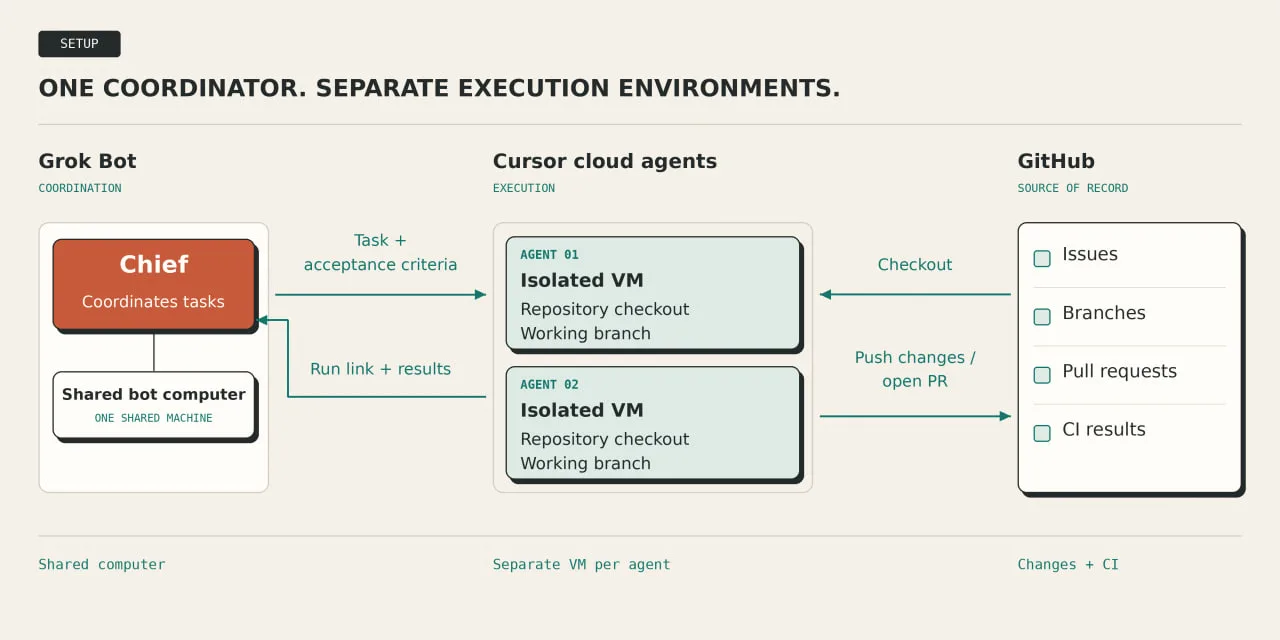
Here’s how the work will be split:
| Component | Job |
|---|---|
| Grok Bot | Receives requests and coordinates work |
| Cursor cloud agents | Run the code and prepare changes in separate environments |
| GitHub | Holds issues, branches, pull requests, and CI results |
Grok Bot’s bots share one account-level computer. Cursor cloud agents run in separate VMs. That distinction matters when several agents need to build and test code simultaneously.
Connect GitHub in both places
In Grok Bot, open Connect apps, find GitHub, and complete authorization. Confirm it appears under Installed.
Then open Cursor Cloud Agents. Connect GitHub for cloud-agent access, select your repository, and complete the guided environment setup. Cursor installs dependencies and saves the environment after a successful build.
Choose Opus 5.5 for the coding agent
Grok Bot chooses its own backend model. You cannot force Opus 5.5 or inspect the model behind an individual Grok Bot request. For explicit model selection, use the cloud coding agent’s configuration and confirm Opus 5.5 is available to your account.
Prepare the repository
For example, I’ll use Cypress Real-World App this time. It includes a frontend, an API, seeded data, and tests for user flows
Create a copy in your GitHub account and select it during cloud environment setup. All changes will stay in your copy
Send Chief this first task:
task: verify_development_environment

repository:
  upstream: https://github.com/cypress-io/cypress-realworld-app
  target: my_connected_fork
  confirm_url: true
  stop_if_missing: true

executor:
  type: cursor_cloud_agent
  stop_if_unavailable: true

model:
  preferred: Opus 5.5
  selection: explicit_if_supported_and_available
  fallback: configured_default
  evidence: launch_configuration
  report_if_hidden: "not exposed"

setup:
  read:
    - README.md
    - .node-version
    - package.json
  node: repository_required_version
  package_manager: yarn_classic
  install: follow_repository_documentation

application:
  command: yarn dev
  run_in_background: true
  readiness:
    frontend_port: 3000
    api_port: 3001

checks:
  - name: types
    command: yarn types
  - name: authentication
    command: yarn cypress:run --spec cypress/tests/ui/auth.spec.ts

boundaries:
  edit_application_code: false
  edit_tests: false
  change_dependency_versions: false
  fix_failures: false
  commit: false
  push: false
  open_pr: false

report:
  - repository_url
  - commit_sha
  - cloud_agent_run_url
  - model_selection_or_not_exposed
  - commands_and_exit_codes
  - service_readiness
  - test_results_and_errors
  - files_changed_during_setup

cleanup:
  stop_processes_started_by_this_task: true
Check the report before assigning implementation work. It should identify the repository and commit, show whether both services started, and include the type-check and authentication-test results.
If a check fails, keep the error as your baseline. Resolve setup failures before testing a code change. Record existing application failures so they don’t get mistaken for regressions later.
A successful first run means the agent can start the application and execute its checks.
- Model selection must be reported separately
- a successful run alone does not confirm Opus 5.5 was used
2. Verification (make the agent test the application)
A typecheck can pass while login fails in the browser.
The agent needs to know how to start the app, reach the login screen, perform the action, and inspect the result.
Lauren’s pstack includes create-verification-skill for this.
It reads the repository and creates instructions that another agent can follow in a fresh session.
Add pstack to Chief
- Open pstack for Grok Bot and choose Add to Grok Bot
- Ask Chief to confirm that the verification workflow is available
The verification must run in the cloud agent’s checkout of your application. Chief should pass the workflow instructions to that executor and collect its results.
Send Chief this task:
Use pstack's create-verification-skill workflow.

Work in my connected copy of:
https://github.com/cypress-io/cypress-realworld-app

Delegate generation and execution to a Cursor cloud agent.
If the workflow or launch tool is unavailable, report the blocker.

Create:
.cursor/skills/verify-rwa/SKILL.md

Include exact instructions for:
- Launch: dependencies, seed data, startup, readiness.
- Doctor: confirm the running instance belongs to this task.
- Drive: interact with the app using its existing test harness.
- Evidence: preserve commands, exit codes, logs, and screenshots.
- Cleanup: stop only processes created by this run.

Create a feature map under:
.cursor/skills/verify-rwa/features/

Start with authentication. Read the existing auth.spec.ts.
Document its entry points, actions, assertions, and prerequisites.
Use selectors found in the repository.

Execute the generated instructions once.
Check that invalid credentials produce the expected error.
Preserve the evidence after cleanup.

Do not modify application code or weaken existing assertions.
Prepare the verification files on a separate branch.
Open a draft PR in my copy. Do not merge.
Give the next agent an exact route
The generated skill should explain five things:
- Launch: which commands start the frontend and API, and how seeded data is prepared.
- Doctor: how to identify the correct instance and detect an unusable environment.
- Drive: which browser actions or existing tests exercise the feature.
- Evidence: where results are saved and what demonstrates success.
- Cleanup: which processes and temporary state belong to this run. GitHub
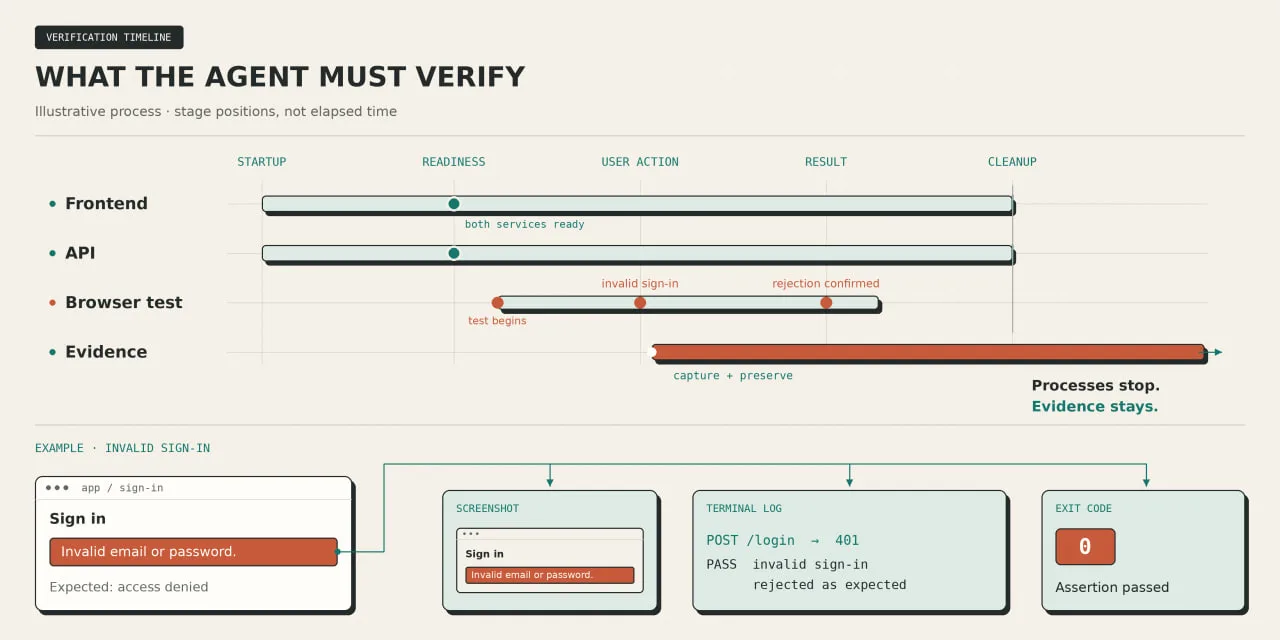
For our first feature, use sign-in with invalid credentials.
The repository already tests this case and checks for the message “Username or password is invalid.” The agent can document and reuse that behavior.
With the application running, the existing checks are:
# Check TypeScript types
yarn types

# Run the authentication tests
yarn cypress:run --spec cypress/tests/ui/auth.spec.ts
These commands are defined by the repository’s scripts and test layout.
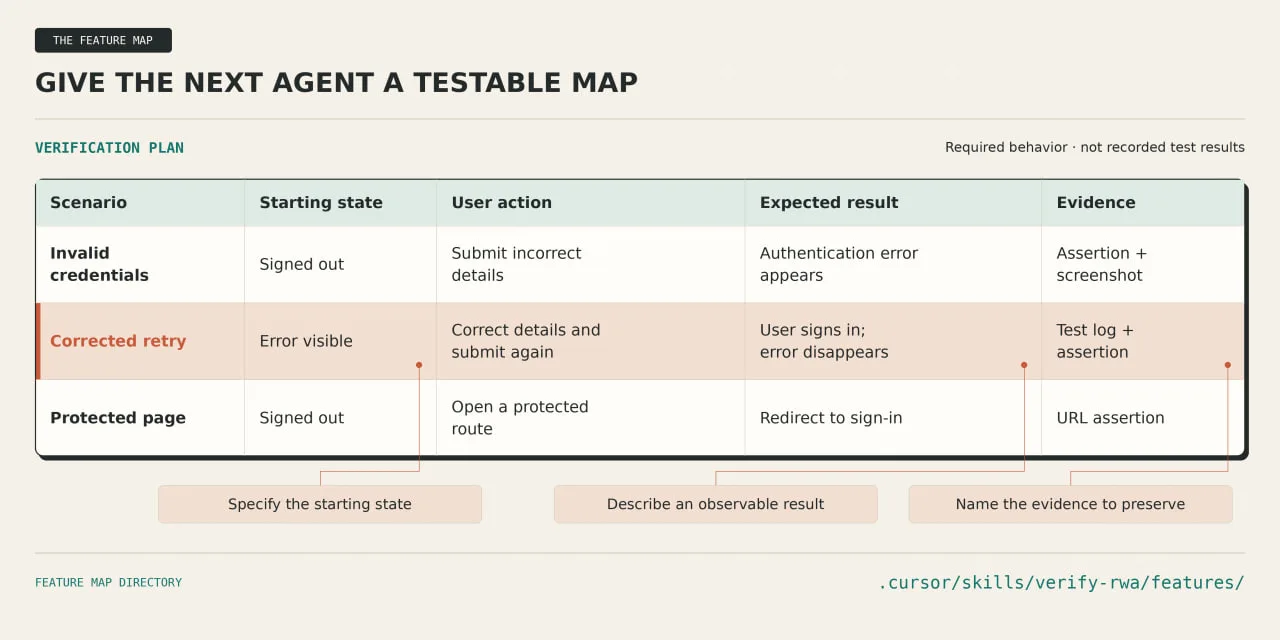
The feature map should record:
- the starting state
- route
- selectors
- actions, and expected result
Include failure conditions: missing seed data, an unavailable API, or an error message that never appears.
Review the generated skill before merging its PR
Check the run evidence and confirm that the files describe commands that actually executed. pstack’s generator requires an end-to-end trial before handing over the skill
Once approved, merge the verification files into your copy. Keeping project skills in the repository makes them available to subsequent cloud-agent runs
The next agent can now read verify-rwa, run the relevant checks, and return evidence with its changes
Expand the feature map as the team starts working on other parts of the application.
3. Team (assign the work)
Add three bots:
- Lead
- Builder
- Reviewer
I’ll use these four roles for our setup. Chief tracks the request. Lead defines the work. Builder manages implementation. Reviewer checks the result against the original requirements.
Create the new bots with New Bot (+) in the sidebar. Send each one its role instructions and ask it to remember them. Grok Bot retains role context across sessions.
Chief (your point of contact)
Update the bot you already created:
role: Chief
remember: true

responsibilities:
  - receive_engineering_requests
  - route_coding_tasks_to_Lead
  - track_owners_and_blockers
  - maintain_issue_run_and_PR_links

status_report:
  include: [current_state, owner, evidence, next_action]

escalate:
  - scope_expansion
  - unresolved_blocker
  - merge_decision

merge_authority: human_only
Lead (planning and delegation)
Lead turns a request into work another agent can finish. Its first deliverable is a plan with acceptance criteria
role: Lead
remember: true

inputs:
  - github_issue
  - repository_context
  - verification_skill

planning:
  inspect_code_before_planning: true
  define_acceptance_criteria: true
  identify_dependencies: true
  specify_checks_for_each_task: true

delegation:
  implementation_owner: Builder
  parallelize: independent_tasks_only
  writers_per_branch: 1

deliverable:
  - implementation_plan
  - task_owners
  - verification_requirements

stop_when:
  - requirements_conflict
  - scope_needs_human_decision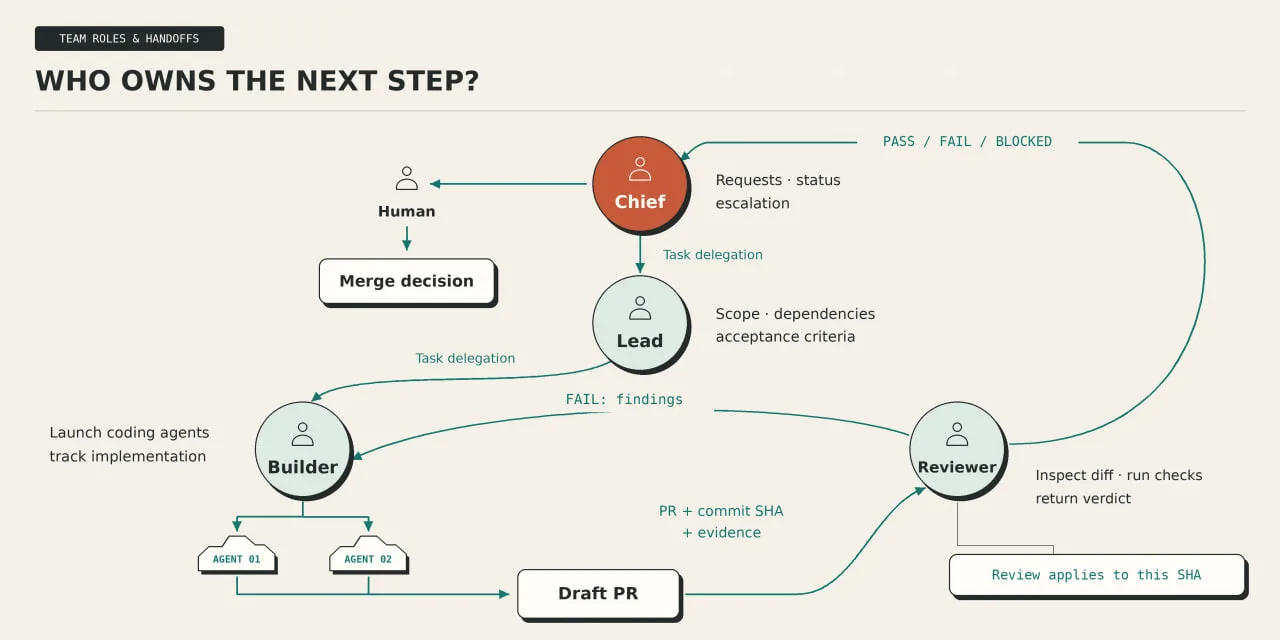
Builder (implementation)
role: Builder
remember: true

executor: Cursor_cloud_agent
verification_skill: .cursor/skills/verify-rwa/SKILL.md

before_launch:
  - confirm_repository_and_starting_commit
  - pass_acceptance_criteria
  - pass_verification_instructions

execution:
  branch_policy: separate_working_branch
  respect_task_scope: true
  report_blockers_with_errors: true

deliverable:
  - draft_PR_url
  - head_commit_SHA
  - cloud_agent_run_url
  - checks_and_exit_codes
  - evidence_links
  - unresolved_issues

handoff_to: Reviewer
forbidden: [merge, push_to_default_branch]
The cloud agent does the coding in its own environment. Builder follows the run and handles the handoff.
Reviewer (independent verification)
Reviewer receives three things:
- The original requirements.
- The PR and exact commit to inspect.
- Builder’s checks and evidence.
Give it this instruction:
role: Reviewer
remember: true

review_target:
  checkout: exact_PR_head_SHA
  read:
    - original_issue
    - acceptance_criteria
    - PR_diff
    - Builder_evidence

verification:
  run_relevant_checks: true
  use: .cursor/skills/verify-rwa/SKILL.md
  inspect_affected_user_flows: true
  preserve_logs_and_artifacts: true

verdict:
  PASS: all_required_checks_passed
  FAIL: confirmed_requirement_failure_or_regression
  BLOCKED: required_verification_could_not_run

report:
  include:
    - reviewed_commit_SHA
    - commands_and_results
    - confirmed_failures
    - unverified_items
    - evidence_links

on_new_commit: invalidate_previous_verdict
on_failure: return_findings_to_Builder
implementation_changes: delegate_to_Builder
merge_authority: none
Put the four bots in one group chat
Choose New chat, select the four bots, and name the group Engineering. Group chats support visible handoffs between bots.
Send the group this shared contract:
project:
  source: https://github.com/cypress-io/cypress-realworld-app
  target: my_connected_copy

handoff:
  required:
    - issue_url
    - current_owner
    - acceptance_criteria
    - branch_and_commit
    - run_or_pr_links
    - verification_results
    - blockers

review:
  verdicts: [PASS, FAIL, BLOCKED]
  invalidate_after_new_commit: true
  missing_evidence: BLOCKED

merge:
  approval_required: true
  approver: human
Bring the team into one chat
Choose New chat, select the four bots, and name the group Engineering. Grok Bot supports persistent roles and group conversations for coordinating work
Give the group one shared rule:
Every handoff must identify the issue, current owner, relevant commit, evidence, and next action
Store lasting project instructions in the repository. Use the group chat for progress and handoffs
When Builder pushes a new commit, Reviewer checks that version before returning another verdict.
4. Issue to PR (run the first task)
Give the team one specific job:
Add a regression test for signing in after a failed attempt.
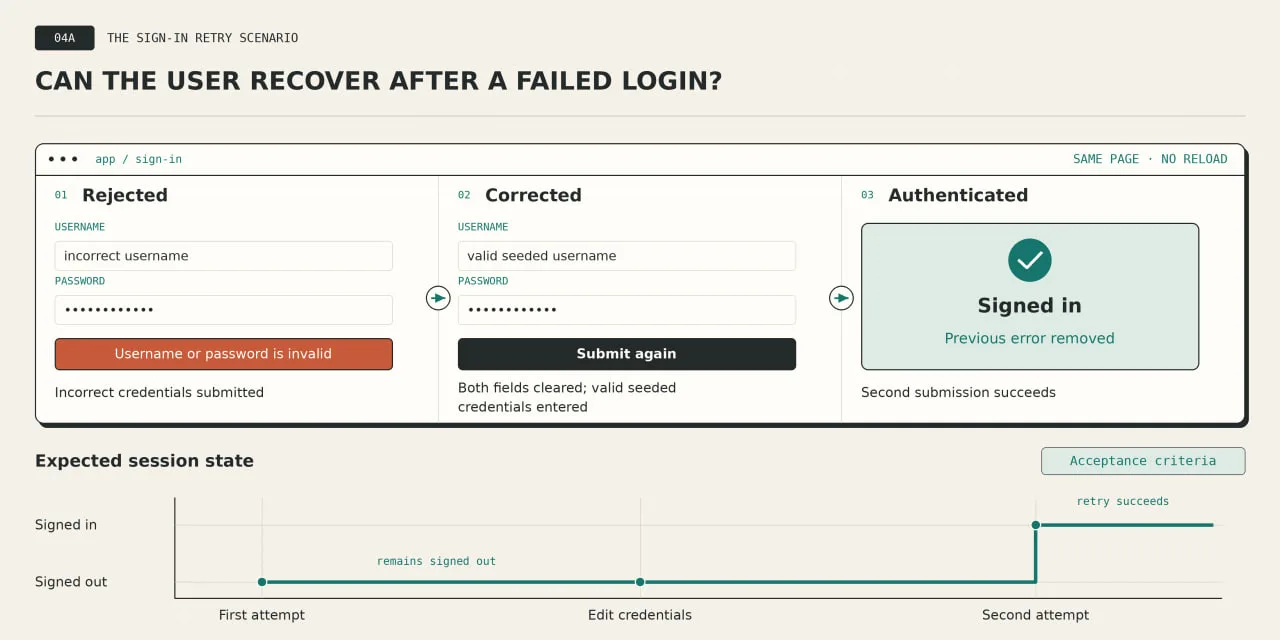
A user enters invalid credentials, sees an error, corrects the fields, and submits again without reloading the page.
The application should accept the valid credentials and clear the error
The repository already includes tests for invalid usernames and passwords. Lead should inspect those tests and check whether this complete retry sequence is covered.
Create the Issue in your GitHub copy
Use these acceptance criteria:
| Action | Expected result |
|---|---|
| Submit invalid credentials | An authentication error appears; the user remains signed out |
| Clear both fields and enter valid seeded credentials | The form accepts the corrected values |
| Submit again without reloading | Authentication succeeds; the previous error disappears |
| Run the existing authentication suite | Existing behavior still passes |
Keep this first task focused on test coverage. If the scenario exposes an application bug, preserve the reproduction and ask for approval to expand the task.
Send the task to Chief
Paste this as a structured task instruction:
task: add_failed_login_retry_coverage

repository:
  source: https://github.com/cypress-io/cypress-realworld-app
  target: my_connected_copy

issue:
  title: "Test successful sign-in after a failed attempt"
  create_if_missing: true
  confirm_repository_before_creation: true

planning:
  owner: Lead
  inspect:
    - cypress/tests/ui/auth.spec.ts
    - cypress/support/commands.ts
    - .cursor/skills/verify-rwa/SKILL.md
  check_for_equivalent_coverage: true
  record_base_commit: true

implementation:
  owner: Builder
  executor: Cursor_cloud_agent
  branch: test/signin-retry
  proposed_spec: cypress/tests/ui/auth-retry.spec.ts
  reuse_existing_seed_and_selector_helpers: true

scenario:
  - submit_invalid_credentials
  - assert_authentication_error
  - clear_username_and_password_fields
  - enter_valid_seeded_credentials
  - submit_without_page_reload
  - assert_authenticated_state
  - assert_previous_error_is_absent

boundaries:
  application_changes: require_human_approval
  weaken_assertions: false
  arbitrary_sleep_calls: false
  merge: false

handoff:
  reviewer: Reviewer
  require:
    - issue_url
    - draft_PR_url
    - base_and_head_commit_SHA
    - test_commands_and_results
    - evidence_links
If equivalent coverage already exists, Lead should link it and report that finding before creating another test.
Let Lead inspect before Builder edits
The plan should identify the existing login helpers, seed-data requirements, and assertions for the authenticated state.
The repository’s cy.login command already interacts with the sign-in fields and waits for the login request. Builder should read its behavior before reusing it for a retry
One coding run owns the implementation branch.
Lead can inspect dependencies while Reviewer reads the acceptance criteria, but both should leave that branch unchanged
For separate tasks later, use independent branches and environments. This application reseeds its database during authentication tests, so simultaneous suites need isolated data.
Check the submitted commit
After Builder creates the new spec, run these commands with the application started through verify-rwa:
# Validate TypeScript
yarn types

# Run the new retry scenario
yarn cypress:run \
  --spec cypress/tests/ui/auth-retry.spec.ts

# Check the existing authentication scenarios
yarn cypress:run \
  --spec cypress/tests/ui/auth.spec.ts

# Inspect the patch
git diff --check
git status --short
git rev-parse HEAD
The new spec path is the file proposed for this exercise. If Lead finds a better location in the existing suite, record that decision in the Issue and update the command.
Reviewer checks out the PR’s exact head commit and repeats the relevant checks. A failed assertion returns to Builder with the command, error, and reproduction steps. An unavailable environment produces BLOCKED.
Make the PR easy to inspect
Its description should contain:
- Change: the scenario added and files affected
- Verification: commands, exit codes, and the tested commit
- Evidence: test output and captured browser results
- Limitations: anything that could not be checked
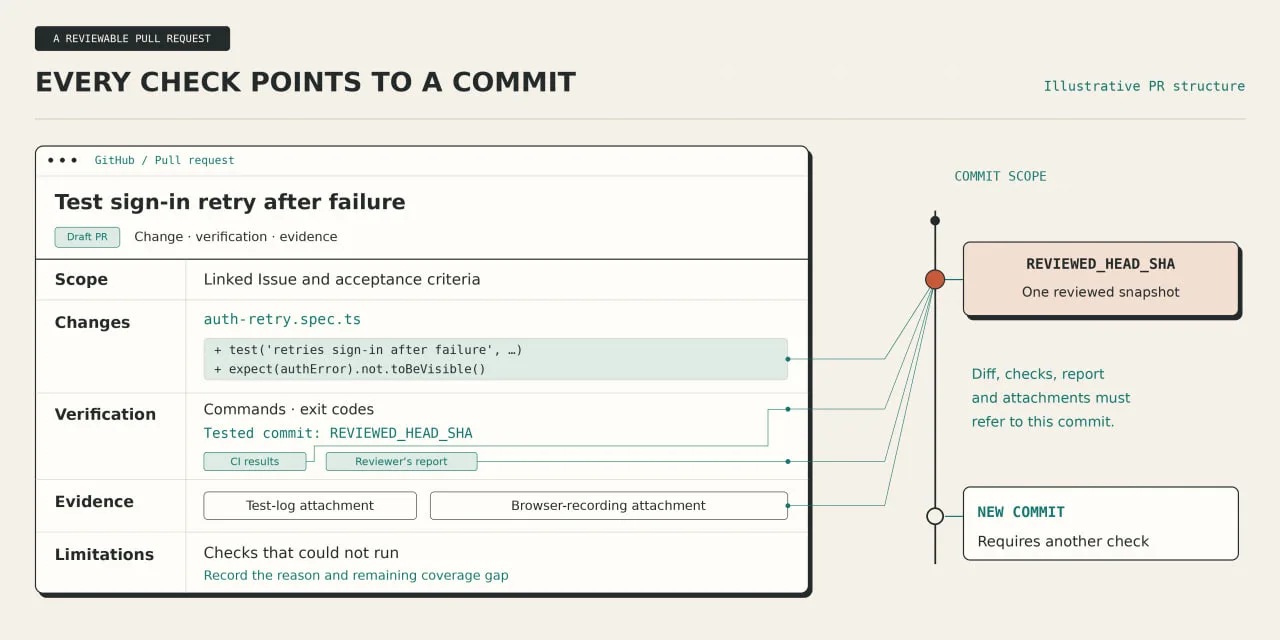
Chief returns the Issue link, PR link, and Reviewer’s verdict to you. Inspect the evidence before approving the merge. Any later commit requires a fresh check of the updated changes.
5. Quality (turn fixes into checks)
When Reviewer catches a mistake, decide what will catch it next time.
A repeated correction can become an architectural constraint, a type error, a lint rule, or a regression test.
Lauren’s /correct workflow follows that order: use the strongest practical enforcement, then document what remains.
For our authentication task, the next step is concrete: run the checks on every PR.
Add the verification job
Enable GitHub Actions in your copy. Ask Builder to inspect the existing workflows and add this job without duplicating checks already present.
Save it as .github/workflows/auth-verification.yml:
name: Authentication verification

on:
  pull_request:

permissions:
  contents: read

concurrency:
  group: auth-${{ github.event.pull_request.number }}
  cancel-in-progress: true

jobs:
  auth:
    name: auth-verification
    runs-on: ubuntu-24.04
    timeout-minutes: 20

    steps:
      - name: Check out the submitted commit
        uses: actions/checkout@v7
        with:
          ref: ${{ github.event.pull_request.head.sha }}
          persist-credentials: false

      - name: Set up Node
        uses: actions/setup-node@v7
        with:
          node-version-file: .node-version
          package-manager-cache: false

      - name: Install Yarn Classic
        run: npm install --global yarn@1.22.22

      - name: Install dependencies
        run: yarn install --frozen-lockfile

      - name: Prepare mock provider configuration
        run: yarn predev:cognito:ci

      - name: Check types
        run: yarn types

      - name: Run authentication tests
        uses: cypress-io/github-action@v7
        with:
          install: false
          start: yarn dev
          wait-on: "http://localhost:3000,http://localhost:3001"
          wait-on-timeout: 120
          spec: "cypress/tests/ui/auth.spec.ts,cypress/tests/ui/auth-retry.spec.ts"
          config: video=true

      - name: Preserve browser evidence
        if: always()
        uses: actions/upload-artifact@v7
        with:
          name: auth-evidence-${{ github.event.pull_request.head.sha }}
          path: |
            cypress/screenshots
            cypress/videos
          if-no-files-found: ignore
The Cypress action supports starting the app, waiting for services, and preserving browser artifacts. The setup commands come from our example repository. If section 04 placed the retry test elsewhere, update spec accordingly.
Run the workflow in your copy before making it mandatory. Resolve environment failures and inspect the test output.
Then configure the merge requirement
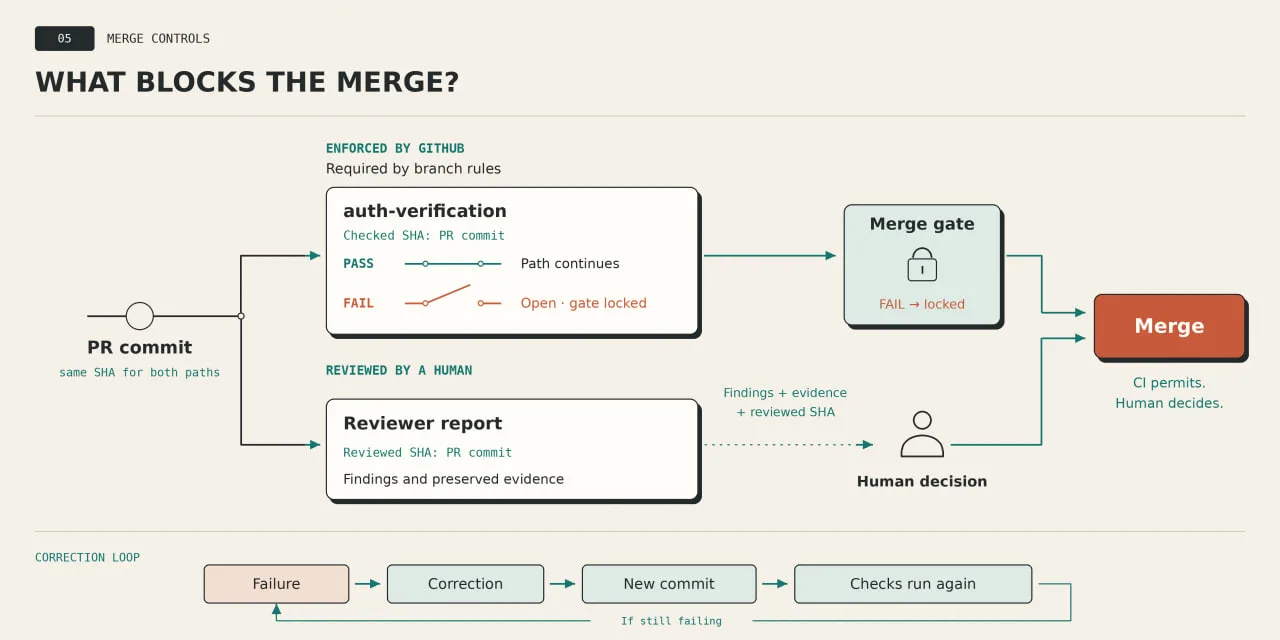
In the default branch’s ruleset or protection settings, require auth-verification before merging.
GitHub supports required status checks
a workflow becomes a merge gate only after you configure that requirement.
Reviewer’s PASS remains a separate report. Before merging, compare its reviewed SHA with the PR’s current head
A new commit needs another review
Automate intake after successful manual runs
Create an agent-ready label in your copy. Add it only to issues with clear scope and acceptance criteria.
Then send Chief this routine instruction:Automate intake after successful manual runs
Create an agent-ready label in your copy. Add it only to issues with clear scope and acceptance criteria.
Then send Chief this routine instruction:
task: create_engineering_intake_routine

schedule:
  frequency: weekdays
  time: "09:00"
  timezone: account_settings

repository:
  target: my_connected_copy_of_cypress_realworld_app

instruction: |
  Find the oldest open issue labeled agent-ready.

  Check for an existing owner, active coding run, or linked PR.
  Skip issues already in progress.

  Process at most one new issue per run.
  Record ownership in the issue before dispatching to Lead.

  Follow the team's planning, implementation, and review process.
  Return the issue, run, and draft PR links in Engineering.

  If verification fails, return the findings to Builder.
  After two unsuccessful correction rounds, stop and report.

  Never merge or expand scope without my approval.
  If no issue qualifies, stop without launching a coding agent.
This is a prompt for Chief to create the routine. Open its details afterward and check the saved schedule and instructions. Grok Bot uses the time zone in its settings
Test it with one small issue first. Routine tests perform real work, so inspect the resulting ownership record, run, and PR
Keep the schedule modest while you measure usage. Each routine execution consumes usage, including runs that find little useful work.
6. Run (measure the result)
Choose another small issue in your GitHub copy. Give it clear acceptance criteria and add the agent-ready label
For this run, send the request to Chief and let the team handle the handoffs.
Record any point where you have to clarify a requirement, restart work, or correct an agent.
Send Chief this final task:
{
  "task": "complete_one_engineering_cycle",
  "repository": {
    "source": "https://github.com/cypress-io/cypress-realworld-app",
    "target": "my_connected_copy"
  },
  "selection": {
    "issue_label": "agent-ready",
    "maximum_issues": 1,
    "skip_work_in_progress": true
  },
  "workflow": [
    "Lead defines scope and acceptance criteria",
    "Builder manages implementation",
    "Reviewer checks the submitted commit",
    "Chief returns the result"
  ],
  "limits": {
    "correction_rounds": 2,
    "scope_expansion": "human_approval",
    "merge": false
  },
  "report": {
    "include": [
      "issue_and_PR_links",
      "cloud_agent_run_links",
      "reviewed_commit_SHA",
      "checks_and_evidence",
      "correction_rounds",
      "human_interventions",
      "unresolved_blockers"
    ],
    "unknown_values": null
  },
  "finish": "reviewable_PR_or_documented_blocker"
}
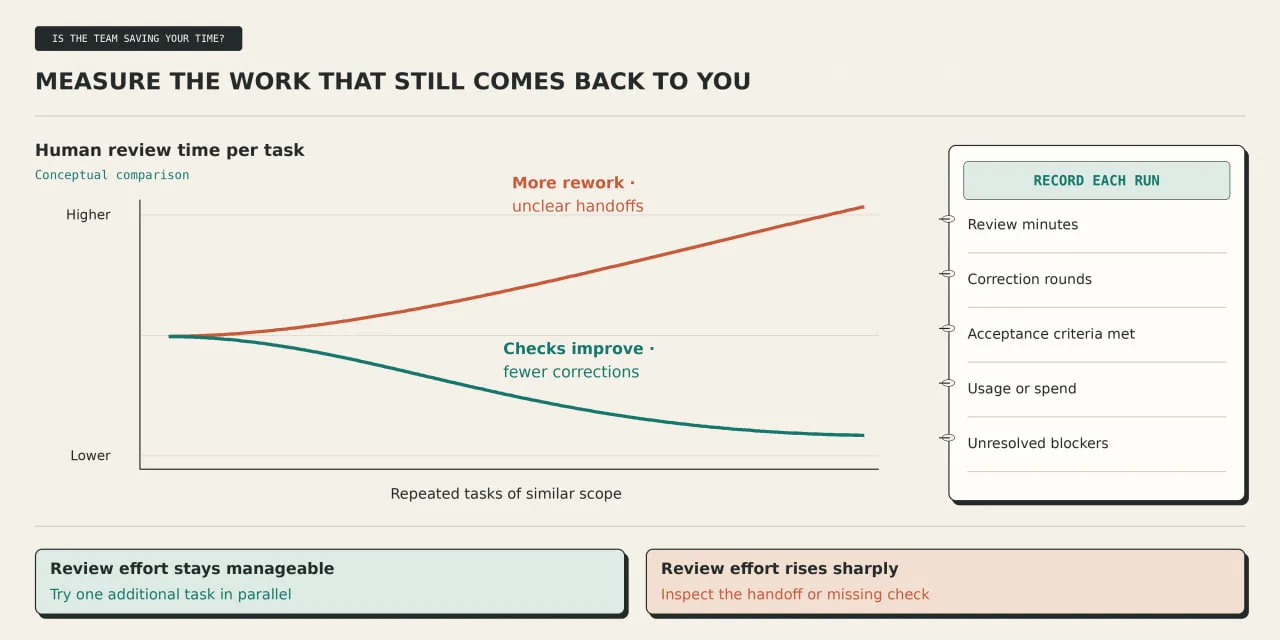
Record four measurements
| Measurement | How to record it |
|---|---|
| Human review time | Time yourself checking the PR and evidence |
| Correction rounds | Count returns from Reviewer to Builder |
| Completion | Compare the result with every acceptance criterion |
| Usage or spend | Read the account’s usage and billing records |
Check usage before and after a dedicated run. Other activity can affect the difference, so record an estimate as an estimate
Grok Bot billing depends on your plan; cloud-agent usage also depends on the selected model and configuration.
If the run stalls
- The agent cannot start the application
Inspect its environment and setup logs. Reproduce the startup failure before changing product code - Two runs touch the same work.
Have Chief identify the owner and stop the duplicate. Confirm which branch and commit will continue - Reviewer cannot execute a required check.
Keep the verdict at BLOCKED. Record the missing dependency, permission, or service - A new commit appears after PASS.
Send that SHA back to Reviewer. Check the latest CI results before approving a merge
After several runs, compare similar tasks.
Look for less time spent reconstructing what happened, fewer repeated corrections, and evidence that remains easy to inspect
Then add one independent task in parallel. Give it a separate branch and environment.
Cursor cloud agents support isolated VMs, which helps keep application instances and test data separate
Keep measuring review time as concurrency grows
If it rises sharply, use the run records to find the slow handoff or missing check before expanding further.
You now have an agent team with clear roles, automated checks, and a workflow from GitHub issue to verified PR.
Thanks for reading. Bookmark this guide and follow me for more!
Nguồn
How to build an agent team in Grok Bot with Opus 5.5 + GitHub (Lauren Tan’s Method) của Chonsy (@0xChonsy), đăng ngày 2026-10-28.
Bài liên quan
- How to Turn Claude Code Into a Reverse Engineering Team with 7 Steps (full setup)
- Stop Picking Models and Spend Less with Viktor (Full Guide)
- Bypass AI content: viết nội dung AI tự nhiên hơn
- Shakker AI: Hướng Dẫn Tạo Ảnh Profile Bằng AI Chi Tiết
- MOKI: AI làm phim hoạt hình Siêu đỉnh của Meitu - App làm đẹp trứ danh
- Đột phá AI bí ẩn (Q*) trí tuệ nhân tạo tổng hợp (AGI)

Bài liên quan
- How to Turn Claude Code Into a Reverse Engineering Team with 7 Steps (full setup)
- Stop Picking Models and Spend Less with Viktor (Full Guide)
- Bypass AI content: viết nội dung AI tự nhiên hơn
- Shakker AI: Hướng Dẫn Tạo Ảnh Profile Bằng AI Chi Tiết
- MOKI: AI làm phim hoạt hình Siêu đỉnh của Meitu - App làm đẹp trứ danh
- Đột phá AI bí ẩn (Q*) trí tuệ nhân tạo tổng hợp (AGI)