

Tóm tắt nhanh
On October 8 REA went to number one on GitHub trending, and ten days later most people who starred it are still running it inside a single chat window.…
- 01. Install REA, then split your machine in two: Everything in this guide sits on top of one install, and it takes about five minutes as long as your Node version is one REA accepts.
- 02. The Analyst: one agent, one binary, one evidence file: The Analyst is the only agent in the team that touches the target, so it gets the most tools and the strictest output format.
- 03. The Spec Writer: the only file that crosses the wall: The Spec Writer reads evidence.md and produces handoff/SPEC.md, which is the single document the Rebuilder will ever see.
- 04. The Rebuilder: a fresh agent that only has the spec: The Rebuilder runs inside the clean container from step 01 and sees one file, SPEC.md, plus the folder it writes code into.
- 05. The Verifier: same inputs into both builds: The Verifier lives in the lab, because it is the only agent that needs the original and the rebuild side by side.

On October 8 REA went to number one on GitHub trending, and ten days later most people who starred it are still running it inside a single chat window.
Bookmark This
every agent file, prompt and command below is written out in full, so you can drop the whole team into your own repo tonight.
Matthew Berman summed up the launch in three words, and that post sits at 3.8 million views now.
Reverse Engineer Anything 😂
Software is done.
— Matthew Berman (@MatthewBerman) · 2026-10-08
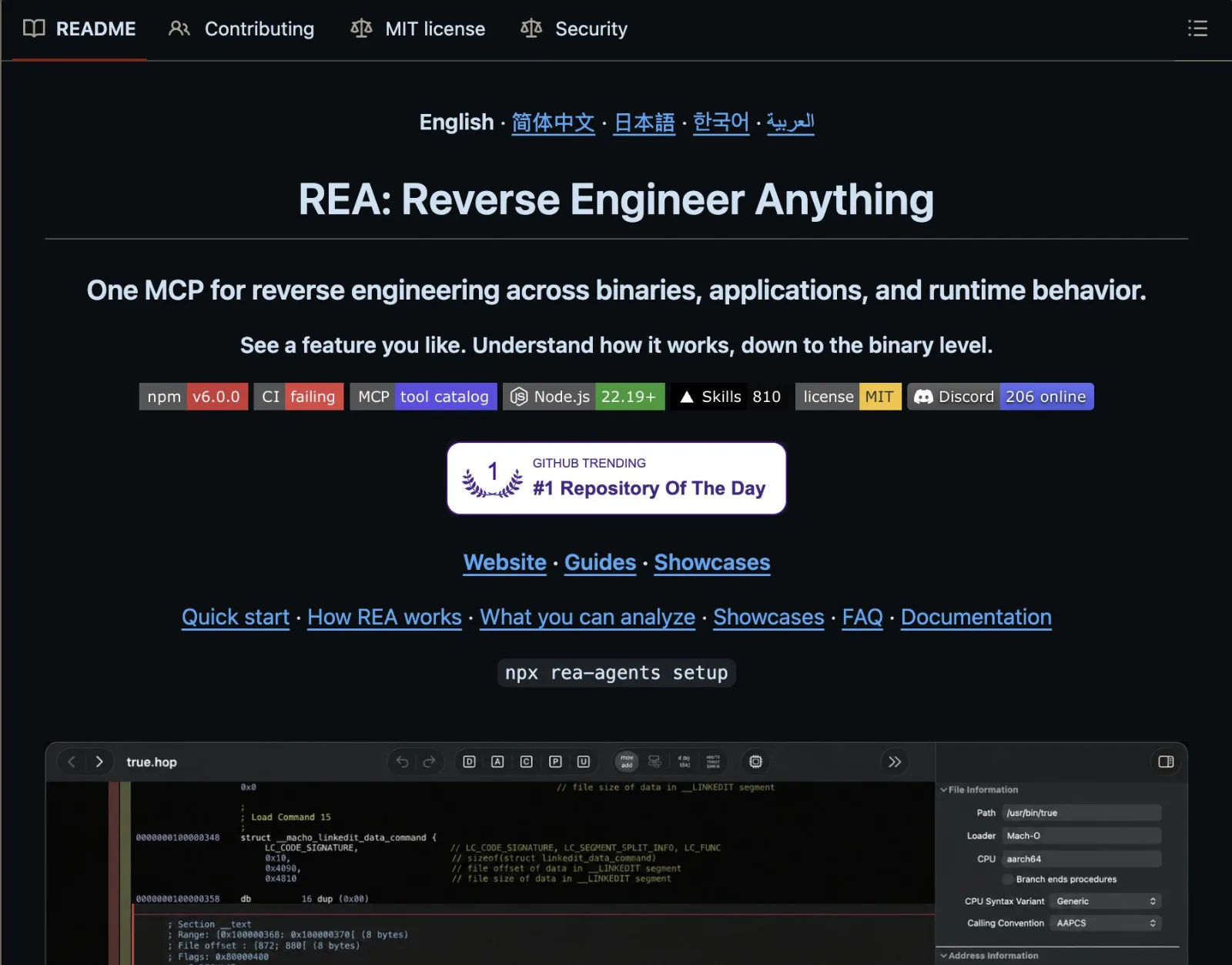
REA is an open-source MCP server and CLI by morluto that hands a coding agent a real disassembler, so it can read an app all the way down to the binary.
The first version went out on July 12, and v6.7 landed this morning with 236 merged PRs from more than 120 contributors.
Two days ago Perplexity turned it into a built-in skill for its Computer agent, which shows how fast this went from a GitHub experiment to a default tool.
REA (Reverse Engineer Anything) by @morluto is now a skill in Computer.
Ask Computer to reverse-engineer an app and it inspects how the app works without its source code, then builds a working version.
Tasks that use /reverse-engineer are free through October 31, up to 10,000 credits per user.
Here are 5 apps Computer made with it, available to try for a limited time:
- Figma: Design with layers and auto-layout, plus sign-in, cross-device sync, and multiplayer editing. Try it: http://ui-editing.pplx.app
— Computer (@AskPerplexity) · 2026-10-16

Before the steps: why one chat breaks
A single session handles one function well and starts drifting somewhere around the fortieth, because by then it is carrying every guess it made along the way.
It renames structs it already named, treats an old hunch as a confirmed fact, and when you ask for a rebuild it reaches straight back into the decompiled code it just read.
Then it reviews its own rebuild and decides it looks right, which is about the weakest check a piece of code can get.
The fix already lives inside Claude Code, since every subagent in .claude/agents/ runs in its own context with its own prompt and its own list of tools it is allowed to call.
So this guide gives four of them one job each:
- Analyst - opens the target through REA, maps it and tags every claim as observation, inference or unknown
- Spec Writer - turns that analysis into behavior only, with no addresses, offsets or decompiled names
- Rebuilder - writes new code from the spec alone and has no REA tools in its config
- Verifier - feeds the same inputs to the original and the rebuild, then reports a match rate
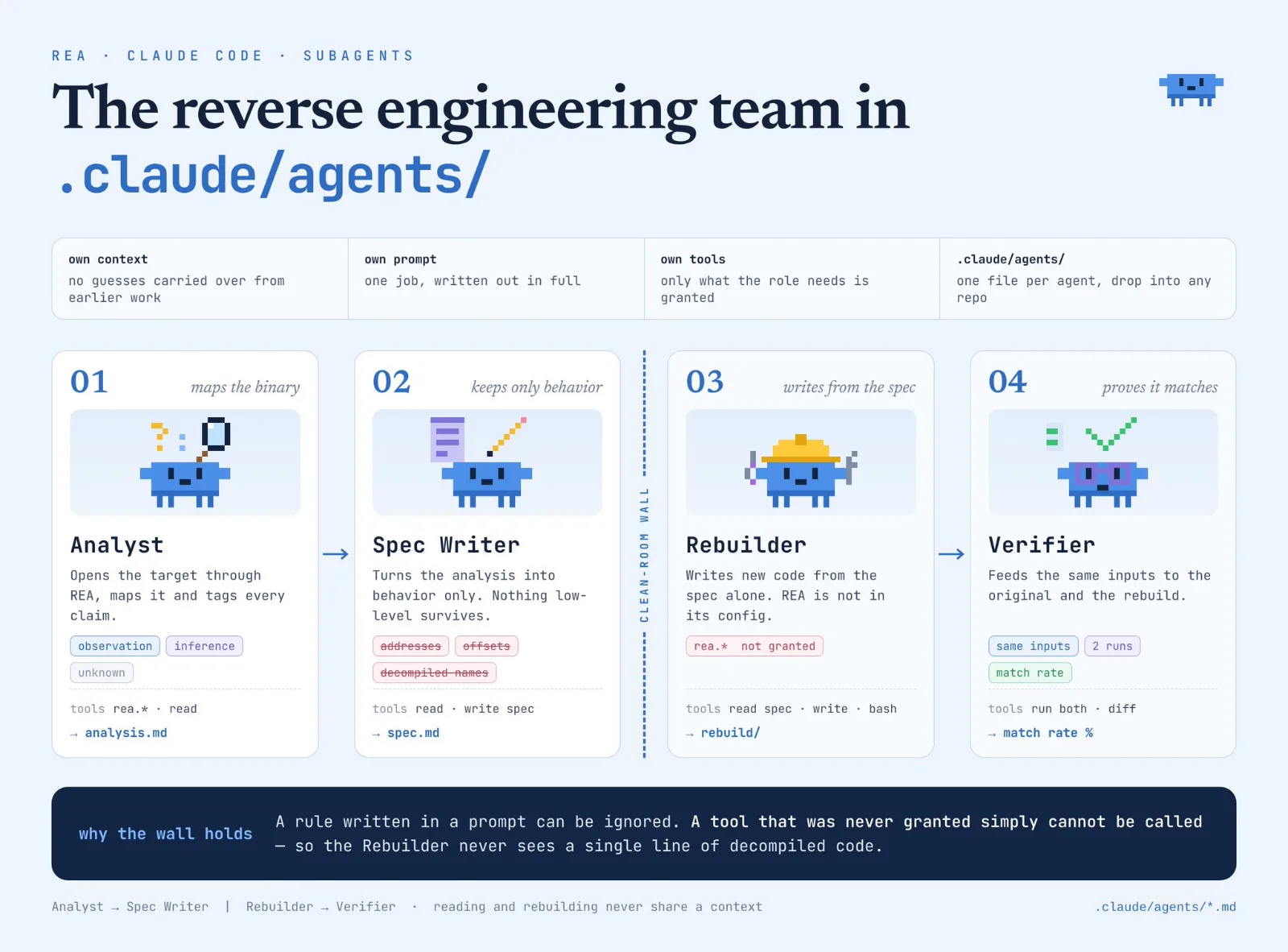
That third line is the part people underestimate, because a rule written in a prompt can be ignored, while a tool that was never granted simply cannot be called.
The clean-room half of this idea is already spreading, and one post on the REA rebuild trick crossed 1,900 bookmarks in two days.
THIS IS A PURE F*CKING GOLDMINE
the best REA trick almost nobody runs yet.
The idea: REA takes the app apart, Jev keeps only what’s proven, and a fresh Opus 5.5 rebuilds the feature from that alone.
Nothing gets copied and no guess makes it into the code, because the builder never sees the original, only the spec Jev signed off on.
You just connect REA like this:
npx rea-agents setup
here’s the split:
→ REA reads the feature down to the binary and writes every rule into SPEC.md → Jev checks each rule against REA’s evidence and sends back anything unproven → a fresh Opus 5.5 session gets only SPEC.md and rebuilds the feature → Haiku 5.5 runs the tests against 3 intentionally broken versions
Opus only shows up at three moments:
→ rebuilding from the approved spec → the checks Jev marks as unclear → signing off before anything ships
REA reads. Jev judges. Opus rebuilds.
That’s the clean-room rule in one line: the model that saw the original never writes the code, and the model that writes the code never sees the original.
the full tree > REA reads the app and writes SPEC.md with evidence for every rule > Jev approves or returns each rule > Opus 5.5 rebuilds from the approved SPEC.md in a fresh session > Haiku 5.5 runs the tests and the 3 broken versions > Jev routes unclear checks back to Opus > /goal keeps going until all 3 broken versions fail
paste the tree and this prompt into Claude Code ↓
“Set up a clean-room rebuild around this tree:
- Use REA to investigate [FEATURE] in [APP]. Write every behavior and rule into SPEC.md, each with the evidence REA found.
- Send each rule to Jev. Any rule without evidence goes back to REA.
- Start a fresh session with only SPEC.md. Rebuild the feature on Opus 5.5 without opening the original.
- Write tests on Haiku 5.5 plus 3 intentionally broken versions. Use /goal until the rebuild passes and all 3 broken versions fail. Show me SPEC.md first. Nothing gets built until I say go.”
↳ https://github.com/morluto/rea
save it, it’ll come in handy.
Archive (@ArchiveExplorer): Jev + Harness Engineering: Build an Agent You Can Inspect and Control ↗
— Archive (@ArchiveExplorer) · 2026-10-16

None of those posts ship the actual files, and that is what the next seven steps are, from an empty .claude/agents folder to a rebuilt feature with a match rate on top.
01. Install REA, then split your machine in two
Everything in this guide sits on top of one install, and it takes about five minutes as long as your Node version is one REA accepts.
That means 22.19 or newer on the 22 line, 24.11 or newer on 24, or anything from 26 up, so check it before you blame the setup.
node -v                                        # 22.19+, 24.11+ or 26+
npx rea-agents@latest setup                    # pick Claude Code, review the plan, approve
npm install --global rea-agents                # the short rea command
npx -y rea-agents@latest doctor --client claude_code --skill --json
Setup shows every file it plans to touch before it writes anything, and for Claude Code it registers a server named rea in ~/.claude.json and installs a workflow skill in ~/.claude/skills.
That server name matters for the rest of this guide, because every REA tool reaches Claude Code with the prefix mcp__rea__, and that prefix is how the agent files decide who gets a disassembler.
REA ships fixes almost daily, and v6.7 landed this morning with 236 merged PRs, so update before your first real target.
rea v6.7 is now live 120+ contributors, 236 merged PRs (many more in commits)
should be much more stable & faster now we fixed a lot of bugs together! https://github.com/morluto/rea/releases/tag/rea-agents-6.7.0
— morluto (@morluto) · 2026-10-18
rea updateThen add an engine only for what you actually plan to read, since Electron apps and .NET assemblies need none and native binaries need Ghidra, Hopper or IDA.
# native apps and games
export GHIDRA_INSTALL_DIR=/absolute/path/to/ghidra
export JAVA_HOME=/absolute/path/to/jdk
npx -y rea-agents@latest doctor --provider ghidra --json
Now the part every clean-room thread skips, and it sits right in REA’s own installation docs.
Hiding the rea server from an agent only changes what it discovers through MCP, so an agent with a shell can still call rea from PATH or npx and open any analysis file left on disk.
The docs say plainly that real separation needs a separate OS account or a container with its own filesystem and network limits, which means the Rebuilder cannot share a folder with the rest of the team.
So the team gets two rooms:
rea-team/
  lab/                              # Analyst, Spec Writer, Verifier. REA allowed
    .claude/agents/analyst.md
    .claude/agents/spec-writer.md
    .claude/agents/verifier.md
    target/                         # the app you own
    analysis/                       # evidence, xrefs, notes
    handoff/SPEC.md                 # the only file that crosses the wall
  clean/                            # Rebuilder. Own container, no REA
    .claude/agents/rebuilder.md
    SPEC.md                         # copied in, read-only
    src/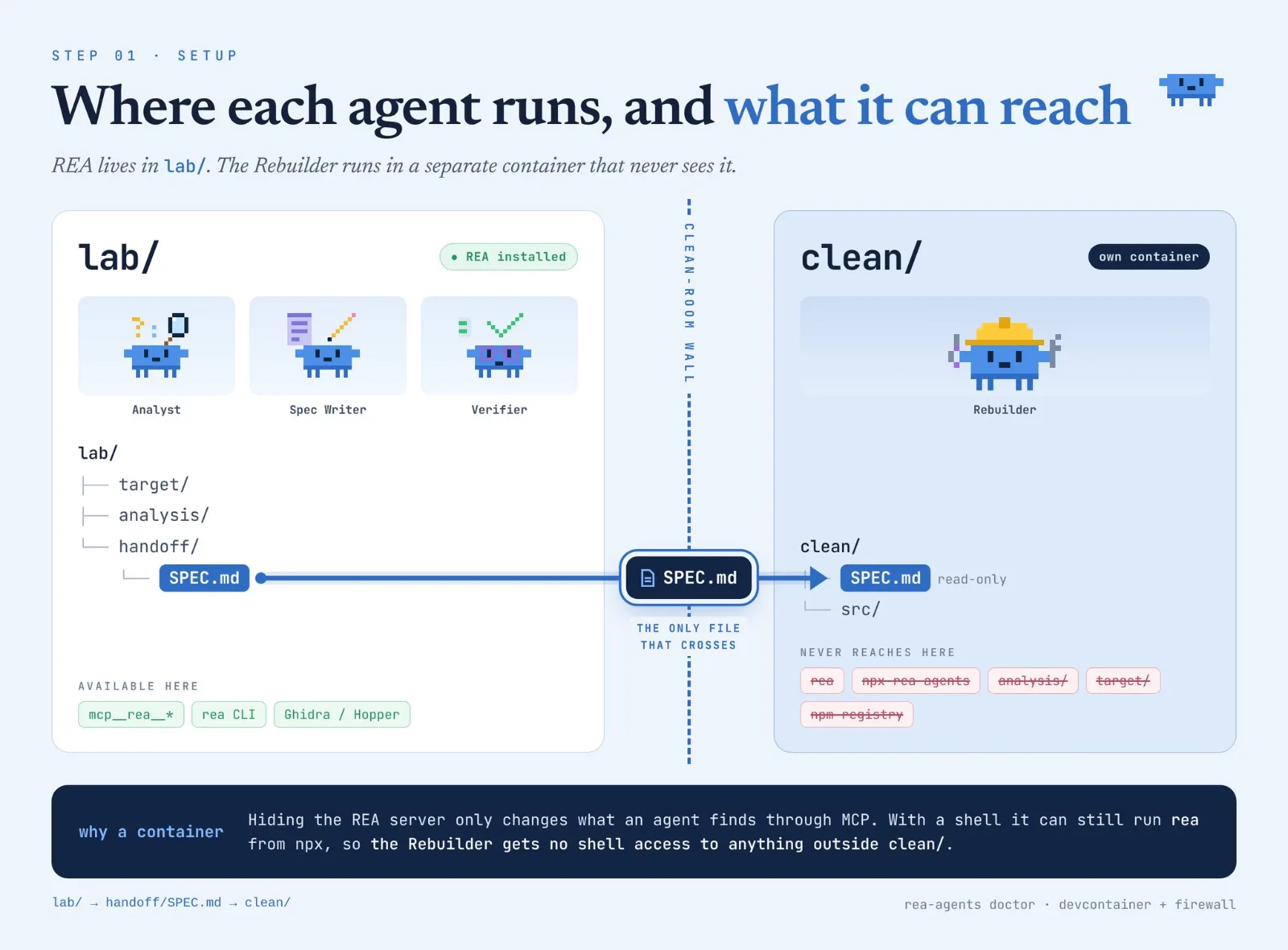
The clean room runs in its own container that mounts nothing but clean/, and Claude Code’s reference devcontainer is a good base, because it already limits outbound traffic to an allowlist.
Install your dependencies first, then take the npm registry off that allowlist, so the Rebuilder cannot pull rea-agents back in through npx halfway through a build.
By the end of this step REA passes doctor in lab, clean is an empty container with a firewall, and exactly one file path is allowed to cross between them.
02. The Analyst: one agent, one binary, one evidence file
The Analyst is the only agent in the team that touches the target, so it gets the most tools and the strictest output format.
Start by asking REA what it actually exposes, because the tool names depend on your version and the docs name this command as the source of the canonical catalog.
rea doctor --json > analysis/doctor.jsonCopy the REA tool names from that file into the tools line below, with the mcp__rea__ prefix that Claude Code adds to every tool of the rea server.
Create lab/.claude/agents/analyst.md:
---
name: analyst
description: Investigates one feature of one target through REA and writes an evidence file. Use first, before any spec or rebuild work.
tools: Read, Grep, Glob, Write, mcp__rea__<tool names from doctor.json>
model: opus
---

You are a reverse engineering analyst. You work on one feature of one target
that the user owns or is authorized to examine.

Process:
1. Identify the target type (native, Electron/JS, .NET, Go, APK, WASM) and
   pick the matching REA tool. Do not start deep analysis yet.
2. Map the target in one paragraph: what it is built with, how big it is,
   where the feature most likely lives. Search strings before opening any function.
3. Rank candidate functions by cross-reference count and work from the top.
   Never read in file order.
4. For each function: purpose in one sentence, data it reads and writes,
   structures it uses, and a confidence from 1 to 10.
5. Under confidence 6, give the function a second pass using its already
   resolved neighbors. Still under 6, mark it unknown and move on.

Every claim carries a tag and its evidence:
- observation: directly seen, with the address or call site
- inference: reasoned from observations, with the observations it rests on
- unknown: needed for the feature and not yet proven

Write everything to analysis/evidence.md. Do not write code for the
feature and do not write a spec. Those are other agents' jobs.
Four decisions in that file carry most of the weight.
The description line is what Claude Code reads when it decides which subagent to hand a task to, so it names the moment to use the agent and says what comes out of it.
The tools line is a short list on purpose, since a subagent that is not given Bash and Edit cannot patch the target or run it by accident, and that matters most on a binary you only meant to read.
REA’s author described the design in one sentence the day he first shared it, and it explains why the Analyst’s tools line is made of REA tools and very little else.
@amasad i wrote a set of tools for agents to RE effectively : )
they can go very far with hopper, ghidra + tools https://github.com/morluto/rea
— morluto (@morluto) · 2026-10-07
The cross-reference rule comes straight from how REA counts things: a function called 147 times is the config loader the whole app depends on, and one called twice is a helper that can wait.
The unknown tag is the one people drop, and it is the one that keeps the Spec Writer honest, because every unknown becomes an explicit gap in the spec instead of a guess that looks like a fact.
Someone writing about REA this week named the same gap from the other side, and it is exactly what this tag closes.
Article: Reverse Engineering with Opus 5.5: From Black Box to Verified Build
— rari🈀 (@0xwhrrari) · 2026-10-15
Now give it a real task from the lab folder:
cd rea-team/lab
claude
> Use the analyst agent on target/Notes.app. Feature: how search ranks results.
The evidence file comes back in a shape like this, and the format is what the next agent depends on:
## F-014  rank_results   (confidence 8)
observation  Called from 3 sites, 147 xrefs, reads the query index and a weight table  [0x100012ab0]
observation  Sorts descending by score, ties broken by modified date  [0x100012c40]
inference    Weights are loaded at startup, based on the config loader call at entry
unknown      Where the weight table gets its default values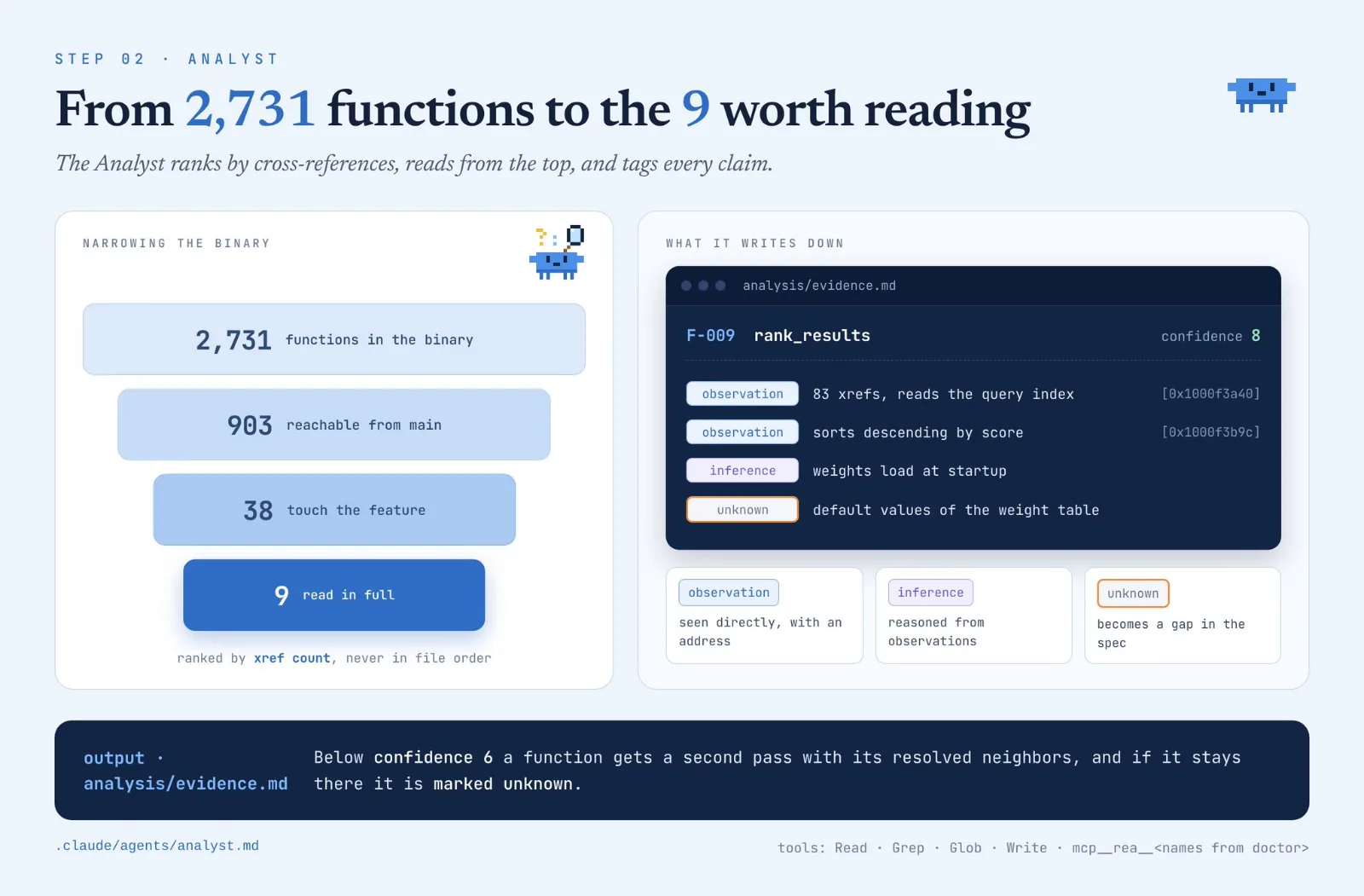
Run it on one feature first, with a scope you can state in a sentence, because a whole app in one pass is how a failed attempt ends up costing roughly twice a successful one.
The Analyst finishes when evidence.md exists and every function that the feature touches has a confidence number, and that file is what the Spec Writer reads next.
03. The Spec Writer: the only file that crosses the wall
The Spec Writer reads evidence.md and produces handoff/SPEC.md, which is the single document the Rebuilder will ever see.
Create lab/.claude/agents/spec-writer.md:
---
name: spec-writer
description: Turns analysis/evidence.md into a behavior-only specification. Use after the analyst finishes and before any rebuild.
tools: Read, Write
model: opus
---

Read analysis/evidence.md and write handoff/SPEC.md.

Describe behavior only: every public interface, the data model, each
user-visible feature as a testable requirement, the file formats read and
written, and error handling.

Never include addresses, offsets, decompiled names, assembly or any code
from the original. A developer who has never seen the binary must be able
to implement a compatible version from this document alone.

Every unknown in the evidence becomes an item under "Open questions".
Never turn an unknown into a requirement.

Sections: Architecture, Data Model, Public API, File Formats, Errors,
Test Cases, Open questions.
The tools line has no Bash and no REA, so this agent can only read the evidence and write one file.
Test Cases is the section to read twice, because each case is an input with its expected output, and the Verifier in step 05 runs those same cases against both builds.
Open questions is what keeps the Rebuilder honest, since a gap that is written down as a gap cannot turn into a confident guess in the code.
The evidence file still contains addresses, so check the spec before it leaves the lab.
grep -nEi '0x[0-9a-f]{5,}|sub_[0-9a-f]+|var_[0-9a-f]+|FUN_[0-9a-f]+' handoff/SPEC.md
# no output means nothing leaked
When the grep is silent, copy the file across and lock it:
cp handoff/SPEC.md ../clean/SPEC.md && chmod a-w ../clean/SPEC.md04. The Rebuilder: a fresh agent that only has the spec
The Rebuilder runs inside the clean container from step 01 and sees one file, SPEC.md, plus the folder it writes code into.
Several people described the same loop this week, with the spec in the middle as the only handoff between reading the app and rebuilding it.
this is getting f*cking dangerous…
REA creator just dropped 20 GitHub repos to build a f*cking reverse engineering studio:
[01] analysis core [02] mobile & apps [03] binary & low-level [04] network & runtime [05] rebuild & verify
how it runs: binary -> REA -> SPEC.md -> rebuild -> oracle -> retry
point it at any app and watch it explain itself.
codila (@0xCodila): Reverse Engineering: How to Get Anything for FREE With Most Dangerous Repo & Opus 5.5 (Full Course) ↗
— Deni (@0xDeniAi) · 2026-10-17

None of those threads show the Rebuilder’s own config, so here it is.
Create clean/.claude/agents/rebuilder.md:
---
name: rebuilder
description: Implements a feature from SPEC.md alone. Use only inside the clean container.
tools: Read, Write, Edit, Bash
model: opus
---

Your only source of truth is SPEC.md.

1. Choose the language and structure that fit your own project. Do not
   try to match the original's internals.
2. Implement each requirement and write a test for every case under Test Cases.
3. Open questions are not yours to answer. Write each one to QUESTIONS.md
   and keep going on everything else.
4. File formats come from public standards named in the spec.
   Every icon, font and sound is drawn in code or openly licensed,
   with a row in ATTRIBUTION.md.
5. If you notice you know something about the original that the spec does
   not say, stop and report it. Do not use it.
Bash is allowed here because the container is the wall, so the agent can build and run its tests without touching anything from the lab.
Before the first run, check that the wall holds with three commands that should all fail:
which rea
npx --no-install rea-agents --version
ls /lab /target 2>&1
When the build passes its own tests, src/ goes back across to the lab so the Verifier can run it, which makes it the second thing that ever crosses the wall.
05. The Verifier: same inputs into both builds
The Verifier lives in the lab, because it is the only agent that needs the original and the rebuild side by side.
Copy src/ across from the clean container first, and run the original inside a VM or sandbox, since this agent executes it.
Create lab/.claude/agents/verifier.md:
---
name: verifier
description: Runs the original and the rebuild on the same inputs and reports where they differ. Use after the rebuilder passes its own tests.
tools: Read, Write, Bash
model: opus
---

Compare the original at target/ with the rebuild at rebuild/.

1. Start with every case under Test Cases in handoff/SPEC.md.
2. Add generated inputs for three groups: ordinary use, edge values
   (empty, maximum size, unicode) and malformed or corrupt input.
3. Run each input through both builds. Compare bytes where output is
   deterministic and meaning where it is not.
4. Label every divergence: compatible (the spec allows it), wrong, or crash.
5. Write report.md with the match rate per group and every divergence
   as input, original output, rebuild output.

Never edit the rebuild. Never edit the spec. Only report.
The Verifier reads and runs but never fixes, so the agent that finds a problem is never the one that gets to make it disappear.
A report looks like this, and these numbers are only an illustration of the format:
ordinary   140 / 140   100%
edge        36 / 40     90%
malformed   22 / 32     69%
total      198 / 212    93.4%

D-007  wrong   input: empty query
       original: returns all items   rebuild: returns nothing
The rebuild has a gap exactly where the original does something the spec never described.
Do not patch it in the code, because the Rebuilder would then be working from the binary through your hands. Turn each wrong divergence into a new case under Test Cases in the spec, send it back through the wall, and run the Rebuilder again.
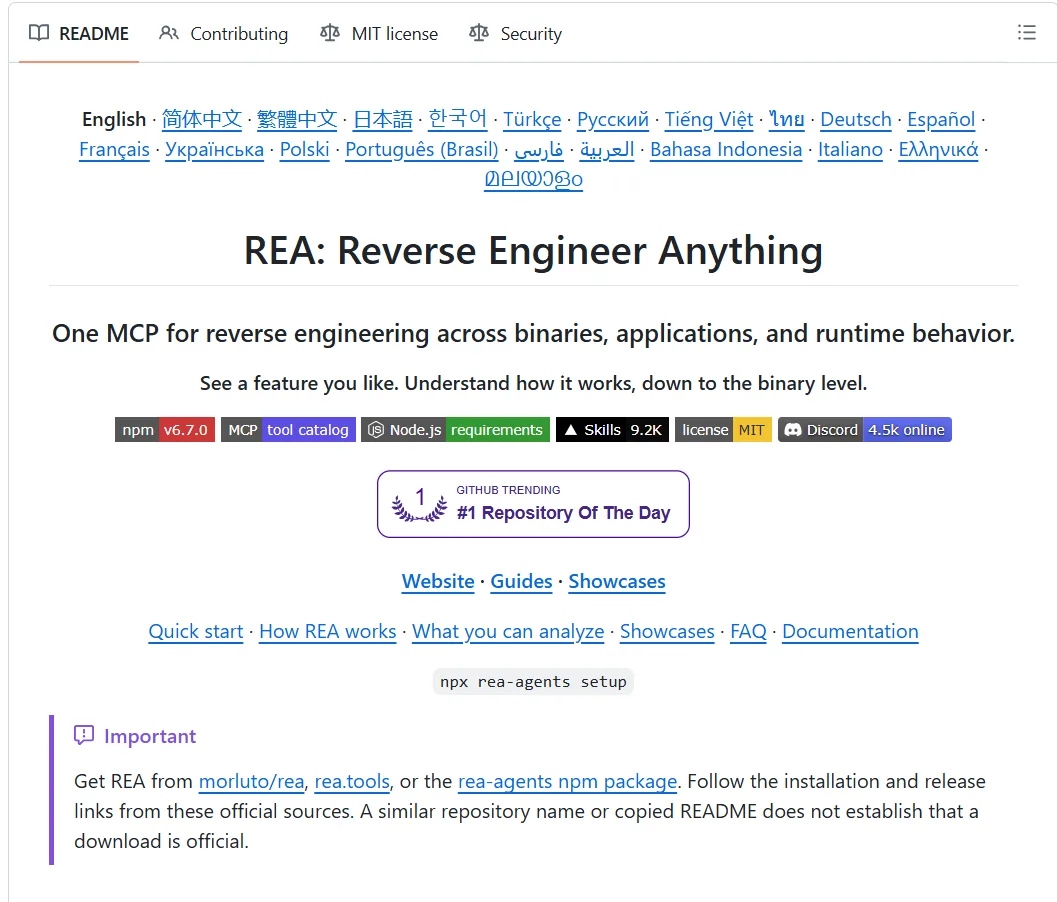
REA’s own showcase uses this method on a DX-Ball sound function, which passed 3,205 original-x86 cases and reproduced all 63 compiled bytes.
06. One command that runs the whole team
The wall is a container boundary, so no subagent can cross it, and a short script has to do the driving.
The script runs the lab agents on the host, hands SPEC.md to the container, brings src/ back, and repeats until the Verifier finds nothing wrong.
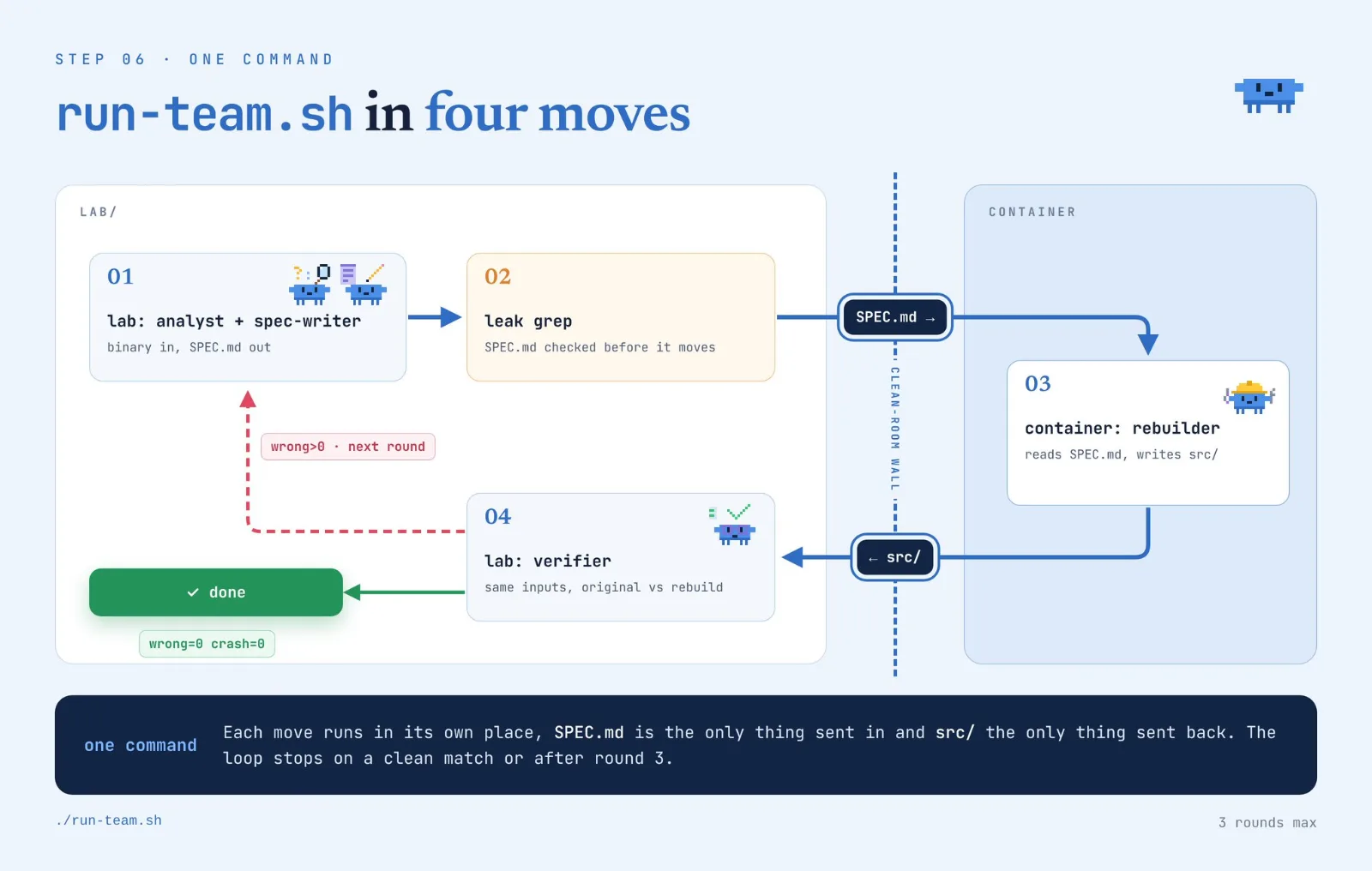
First add one line to the end of the Verifier’s prompt from step 05, because the script needs something it can test:
End report.md with a single line: RESULT wrong=<n> crash=<n>Then create run-team.sh next to lab/ and clean/:
#!/usr/bin/env bash
set -euo pipefail
TARGET="$1"; FEATURE="$2"; MAX_ROUNDS=3
cd "$(dirname "$0")/lab"

claude -p "Use the analyst agent on $TARGET. Feature: $FEATURE"
claude -p "Use the spec-writer agent to write handoff/SPEC.md from analysis/evidence.md"

for round in $(seq 1 "$MAX_ROUNDS"); do
  if grep -nEi '0x[0-9a-f]{5,}|sub_[0-9a-f]+|var_[0-9a-f]+|FUN_[0-9a-f]+' handoff/SPEC.md; then
    echo "spec leaks decompiled names, stopping"; exit 1
  fi

  docker cp handoff/SPEC.md rea-clean:/work/SPEC.md
  docker exec rea-clean claude -p "Use the rebuilder agent on /work/SPEC.md"
  rm -rf rebuild && docker cp rea-clean:/work/src ./rebuild

  claude -p "Use the verifier agent."
  tail -n 1 report.md
  grep -q 'RESULT wrong=0 crash=0' report.md && { echo "parity reached in round $round"; exit 0; }

  claude -p "Use the spec-writer agent to add every wrong or crash divergence in report.md as a case under Test Cases in handoff/SPEC.md"
done
echo "no parity after $MAX_ROUNDS rounds, read report.md"; exit 2
Run it with the target and the feature in plain words:
./run-team.sh target/Notes.app "how search ranks results"Three details in the script matter more than they look.
The leak check runs before every handoff and not only the first one, since the Spec Writer edits the spec again each time a round fails.
The loop stops at three rounds, because a rebuild that is still wrong after three passes usually has a gap in the evidence, and more rounds only spend tokens.
The only thing that goes from the report back to the Rebuilder is a new test case in the spec, so the original’s behavior reaches the clean room as behavior and never as code.
07. Run it on one feature you own, and know where it stops
Pick a program you wrote or are allowed to examine, and a feature small enough to describe in one sentence, such as how search ranks results or how an export file is laid out.
Electron apps and .NET assemblies are the easiest first target, since REA reads both with no native engine, and Ghidra can wait until your second run.
REA’s author said on the 11th that people were already pointing it at everything from farm equipment to cars and drones.
i think the coolest thing about rea is everyone contributing what they’re working on
i’m seeing people work on agriculture tech, cars, drones & all manner of consoles
rea today isn’t perfect but together we’re putting it all together
thank you to all our contributors!
— morluto (@morluto) · 2026-10-11
Start the run and read three files in this order: evidence.md for its unknowns, the Open questions in SPEC.md, then report.md.
./run-team.sh target/YourApp.app "how search ranks results"Put your own numbers at the top of whatever you publish: the match rate, how many rounds it took and the tokens spent.
The limits are short, and all of them come from how REA works:
- REA reads what is on your machine, so code that runs on a company’s servers was never shipped to you
- decompiled code is a reconstruction, which is why step 05 compares behavior and not source
- stripped native binaries stay harder than Electron or .NET
- a function that stays under confidence 6 after its second pass is marked unknown, and the run moves on
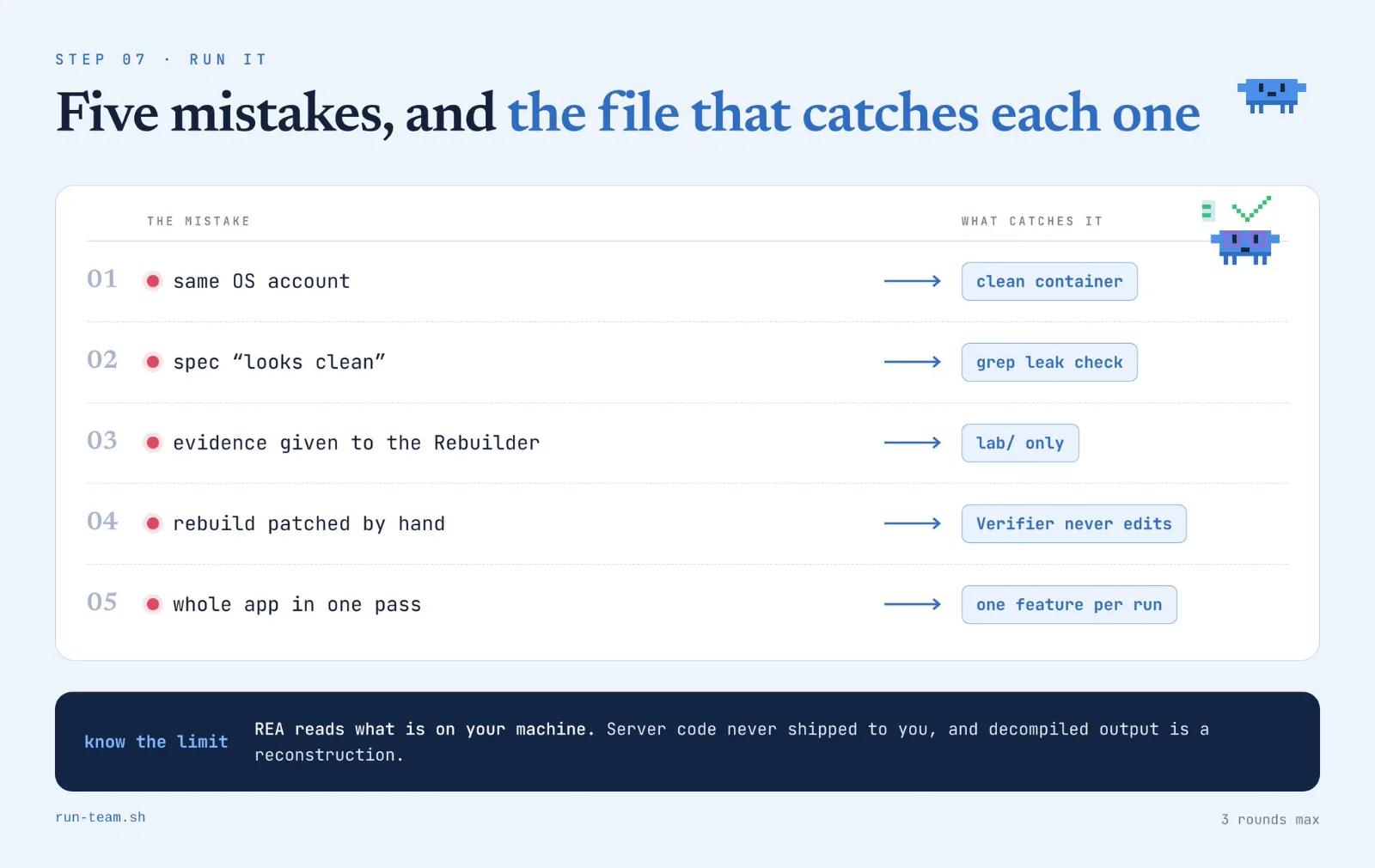
Five mistakes cost the most time in this setup:
- running REA and the Rebuilder under the same OS account
- skipping the leak grep because the spec “looks clean”
- giving the Rebuilder evidence.md for context
- fixing the rebuild by hand after the Verifier rejects it
- pointing the Analyst at a whole app instead of one feature
REA’s own disclaimer limits use to lawful research, interoperability, software preservation and software you own or are authorized to examine.
A license agreement can forbid reverse engineering even where the law does not, so read the one that came with your target, and treat this guide as engineering, not legal advice.
The loudest reaction to all of this came from Replit’s CEO, who said software is on its way to being open source by default.
What’s happening in the AI-powered reverse engineering and decompilation is absolutely insane. Pretty soon all software will be de facto open-source.
AI is coming for everything and everyone.
— Amjad Masad (@amasad) · 2026-10-07
That prediction only holds for software whose owner allows it, which is why the first line of your claude-md house rules should say that the target must be yours or authorized.
A developer has been counting public cases of agents taking apart software and hardware, and the list was at 286 this week, 119 of them done with REA.
TERSİNE MÜHENDİSLİKLE İLGİLENENLER İÇİN GERÇEK BİR HİLE KODU 🔓🔥
Bir geliştirici, yapay zeka ajanlarının yazılım ve donanımları parçalarına ayırdığı tüm vakaları topluyor ve sayı şimdiden 286’ya ulaştı.
Bunların 119’u, Claude Code ve Codex gibi ajanlara gerçek tersine mühendislik araçları kazandıran açık kaynaklı MCP aracı **REA** ile yapıldı.
İşte listeden dikkat çekenler: → **67 Oyun:** Eski DOS dosyalarından 17 ajanın decompile ettiği Modern Warfare 2’ye kadar. → **64 Cihaz ve Donanım:** Mac menü çubuğundan kontrol edilebilen akıllı klozet dahil akıllı cihaz ürün yazılımları. → **128 Masaüstü ve Mobil Uygulama:** Yeniden inşa edilen veya açılan popüler yazılımlar. → **27 Algoritma:** Doğrudan ikili (binary) dosyalardan kurtarılan özel algoritmalar.
Her kayıt hangi aracın kullanıldığını, sonucun onaylanıp onaylanmadığını belirtiyor ve liste günde 6 kez güncelleniyor.
Tipik bir REA süreci nasıl işler? → REA, kodlama ajanınıza bir MCP olarak bağlanır. → Ajan ikili dosyayı haritalandırır ve fonksiyonları bulur. → Çalışma zamanı izlemeleri her fonksiyonun ne yaptığını doğrular. → Ajan özelliği yeni kod olarak yeniden inşa eder ve orijinaliyle karşılaştırarak test eder.
Claude Code’a şunu yapıştırın: > “Install the REA reverse engineering MCP. Pick one small app I own, map its binary, trace the function behind one feature and rebuild that feature as a standalone script with a test that compares it to the original. Show me the plan first, no edits until I say go.”
GitHub: https://github.com/songshikang0111/awesome-REA-cases
Bu paylaşımı kaydet, tersine mühendislikteki bu devrimi kaçırma.
KAYDET ve PAYLAŞ 📌 @DeepTechTR https://x.com/morsenxxx/status/2111095949321752678/video/1
— DeepTechTR (@DeepTechTR) · 2026-10-17

The whole setup in one screen
Seven steps give you four agent files, two separated rooms and one script that runs them.
- 01 REA installed in lab/, the Rebuilder in its own container with no REA
- 02 Analyst: ranks functions by cross-references and tags every claim as observation, inference or unknown
- 03 Spec Writer: turns the evidence into behavior only, then a grep checks it for leaks
- 04 Rebuilder: writes code from SPEC.md alone and logs every open question
- 05 Verifier: runs the original and the rebuild on the same inputs and reports a match rate
- 06 run-team.sh: drives both rooms for up to three rounds
- 07 one feature of a program you own, run end to end
After the first run you have a report with a match rate on top of it, and that number is what shows whether the rebuild matches the original.
I post my AI builds and experiments with the full configs and the numbers behind them, so follow @Gyome1_ if you want the next one when it comes out.
Bookmark this article, because the agent files and the script above are the part you will come back to.
Nguồn
How to Turn Claude Code Into a Reverse Engineering Team with 7 Steps (full setup) của Gyomei (@Gyome1_), đăng ngày 2026-10-18.
Bài liên quan
- Stop Picking Models and Spend Less with Viktor (Full Guide)
- How to build an agent team in Grok Bot with Opus 5.5 + GitHub (Lauren Tan's Method)
- Bypass AI content: viết nội dung AI tự nhiên hơn
- Shakker AI: Hướng Dẫn Tạo Ảnh Profile Bằng AI Chi Tiết
- MOKI: AI làm phim hoạt hình Siêu đỉnh của Meitu - App làm đẹp trứ danh
- Đột phá AI bí ẩn (Q*) trí tuệ nhân tạo tổng hợp (AGI)




Bài liên quan
- Stop Picking Models and Spend Less with Viktor (Full Guide)
- How to build an agent team in Grok Bot with Opus 5.5 + GitHub (Lauren Tan's Method)
- Bypass AI content: viết nội dung AI tự nhiên hơn
- Shakker AI: Hướng Dẫn Tạo Ảnh Profile Bằng AI Chi Tiết
- MOKI: AI làm phim hoạt hình Siêu đỉnh của Meitu - App làm đẹp trứ danh
- Đột phá AI bí ẩn (Q*) trí tuệ nhân tạo tổng hợp (AGI)