


The major technological improvements in Corel 2018—the latest version currently available help you create and optimize projects in the shortest possible time. If you use a Wacom drawing tablet or a computer monitor that supports drawing directly on the screen, you can skip sketching on paper and scanning, and go straight to Corel’s fantastic new Live Sketch tool to capture and develop creative ideas instantly.
Although it was released last year, this graphic design software suite (covering both design and video, etc.) continues to receive the latest updates to improve performance and optimize the experience for designers.
The Illustrations & Graphic Design part of Corel 2018 is similar to Adobe Illustrator CC 2018, with two editions: CorelDRAW Graphics Suite 2018 and CorelDRAW Home & Student Suite X8. And if you are going to use it, you might as well choose the unlimited CorelDRAW Graphics Suite 2018, with no feature restrictions, rather than feel constrained by the Home or Student edition.
Of course, any new release from Adobe or Corel is essential for designers at every level, from beginners to professionals. Here, I will just go over a few notable changes compared with the older version (naturally, the new version launches faster and runs more smoothly).
- Symmetry drawing mode
- Block Shadow tool
- Publish directly to WordPress
- AfterShot 3 HDR
- Interactive photo straightening
- Interactive photo perspective adjustment
- Apply envelopes to bitmaps
- LiveSketch tool
As for installing and activating CorelDRAW Graphics Suite 2018, the installation, activation, and usage procedures are very different from those of older versions. If you do not know how, successfully installing and using it can be very difficult, even though the process is actually extremely simple, easy, and quick.
The most common error that makes many people give up before they even get started occurs after the installer has been running for a while and you enter the keygen: a message like this appears. If you do not know what to do, you may end up giving up on the latest version and choosing to return to an older one, such as Corel X7 2017.
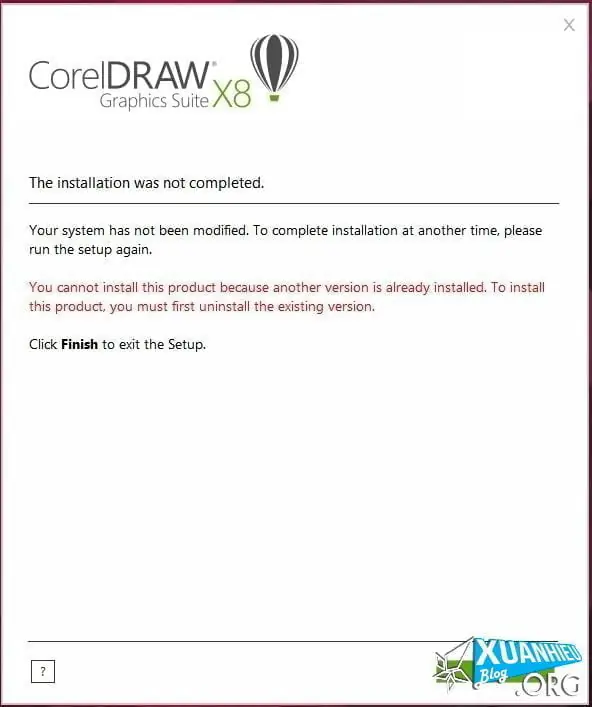 This error occurs because the CorelDRAW Graphics Suite 2018 installation package includes Microsoft Visual C++ Redistributable, which conflicts with the version already installed on your computer (Microsoft Office, for example, also installs this Visual C++ component during setup). As a result, Windows will not allow the installation, and only after wasting several minutes thinking the installer has frozen do you discover that Corel Draw is reporting an error.
Just two simple clicks to uninstall Microsoft Visual C++ 2017 Redistributable or Microsoft Visual C++ 2015 Redistributable, both the 32-bit and 64-bit versions, and you are done—there is no need to uninstall them all.
Remember: only uninstall 2015 or 2017, depending on your computer. If you have time on your hands and decide to uninstall the entire Microsoft Visual C++ list, causing minor errors in the process, just use Windows 10’s built-in Windows Update to fix them in a flash. Extremely convenient.
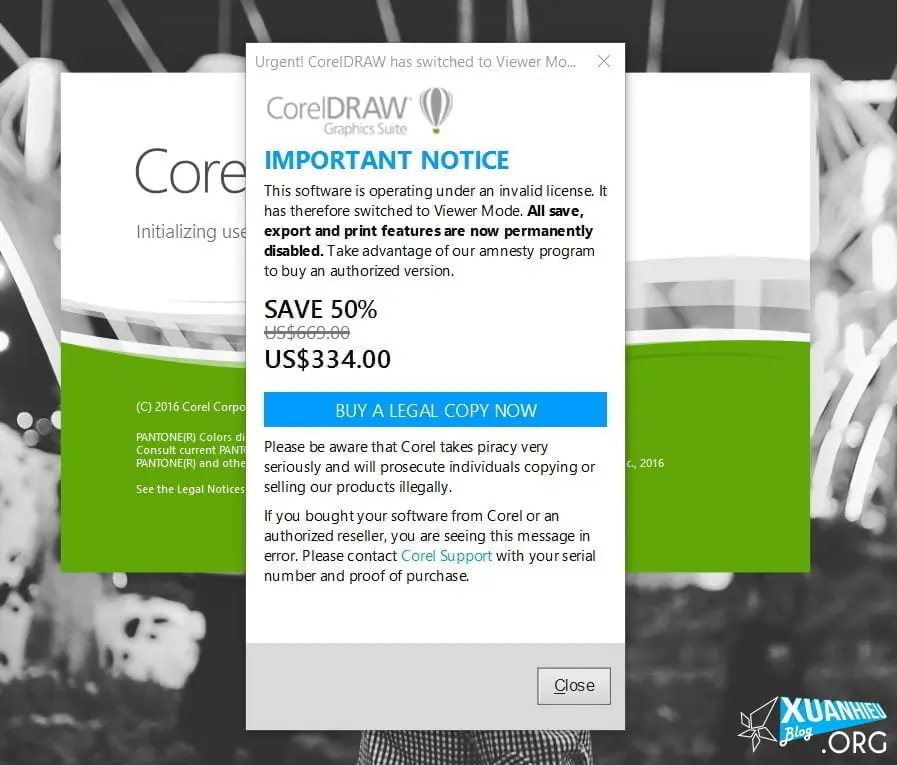
Of course, the 2018 version is also very different in that you do not need to go through much activation: just enter the keygen at the start of installation, and you can use it forever. Keep in mind that every time you open it, a dialog will appear saying something along the lines of “You are using pirated software, please Buuuuy.” Remember to click Close to enter the software; otherwise, you could wait until Lunar New Year (Tết) and it still would not open.
Watch the video at the top or below.
Bài liên quan
- Download Comet Perplexity AI Browser (Latest 2026): Official Links & How to Get an Invite Code Instantly
- Case study "Cổ Nhân Chỉ Lộ": the secret to attracting millions of views using AI images
- What Is Checkpoint 282? A Guide to Unlocking Facebook Checkpoint 282
- Threads – a traffic goldmine affiliate marketers cannot afford to miss
- How to Clone a Landing Page
- How to check the number of like reactions on Facebook after the Like counter is hidden
- "Conversation with Thanh" Nguyễn Thành Nam: When the essence of liberation slips into the frivolity of history
- Bypass AI content: make AI writing sound more natural